Table of Contents
Please note: This page is not formatted for mobile, it is meant for desktop reference only.
Logos
Color Options
B/W Options
Brand Colors
Primary
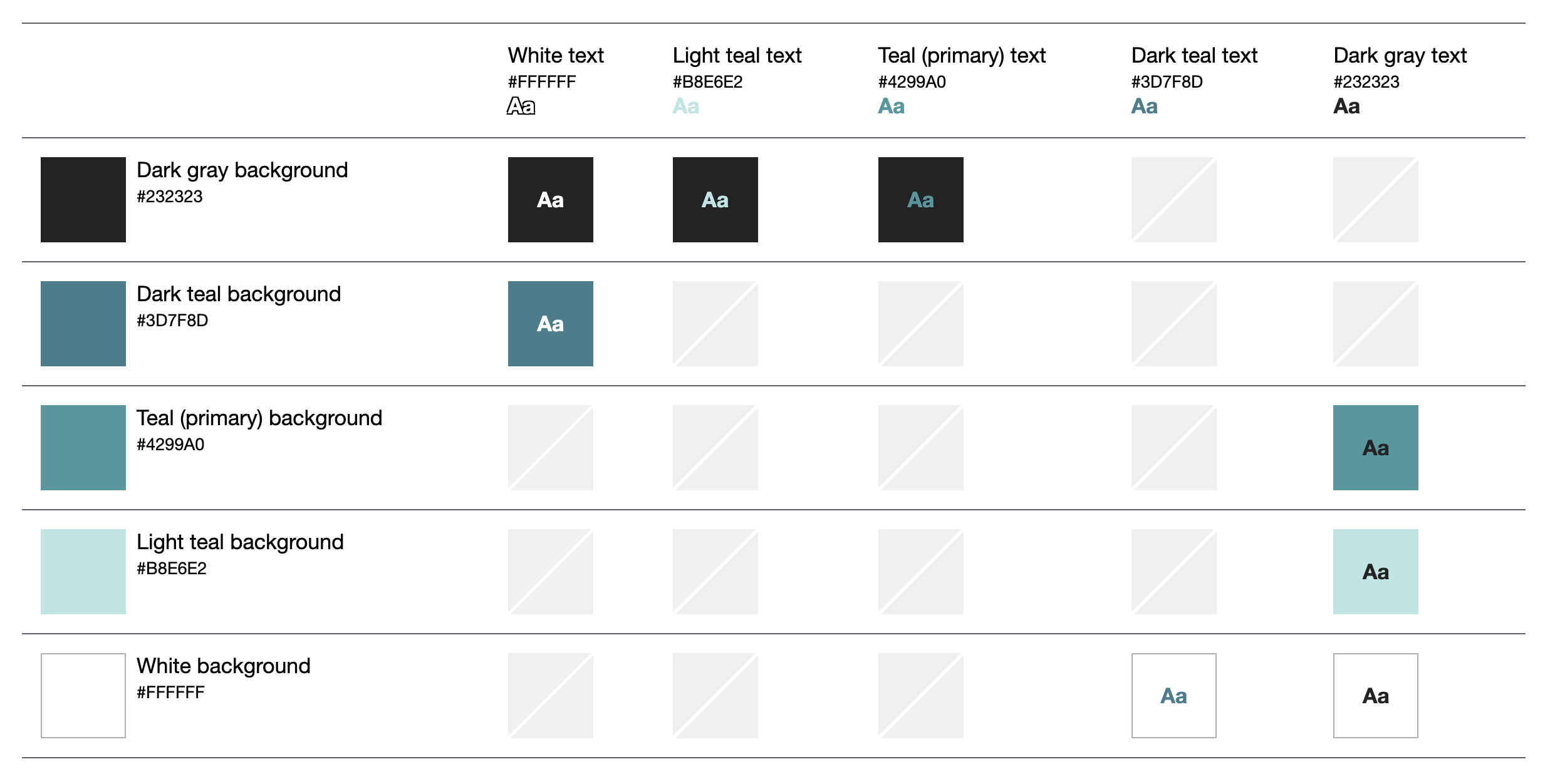
Light Teal
Hex #b8e6e2
Teal
Hex #4299a0
Secondary
Light Green
Hex #09d6ab
Green
Hex #64c4b9
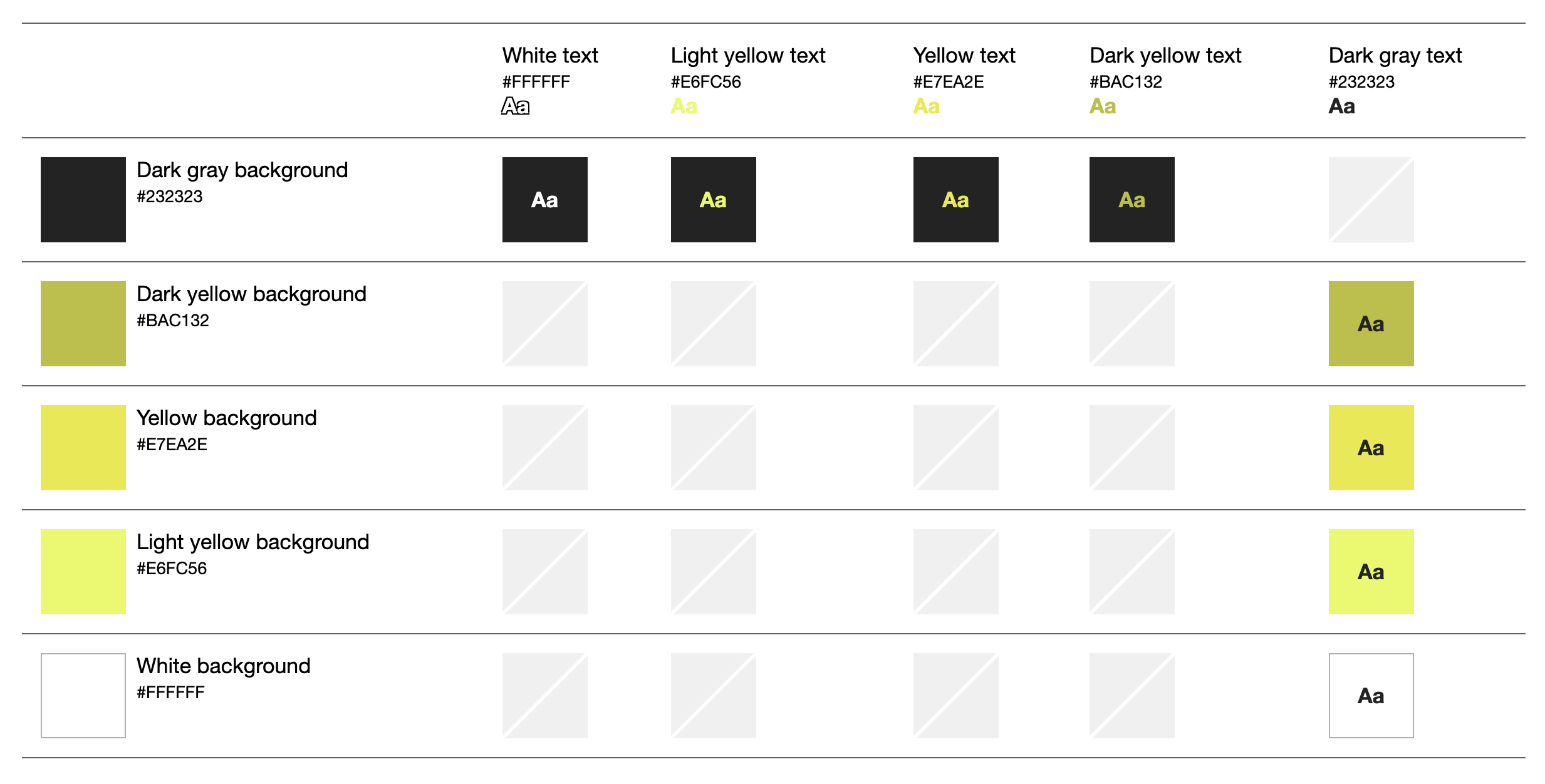
Light Yellow
Hex #e6fc56
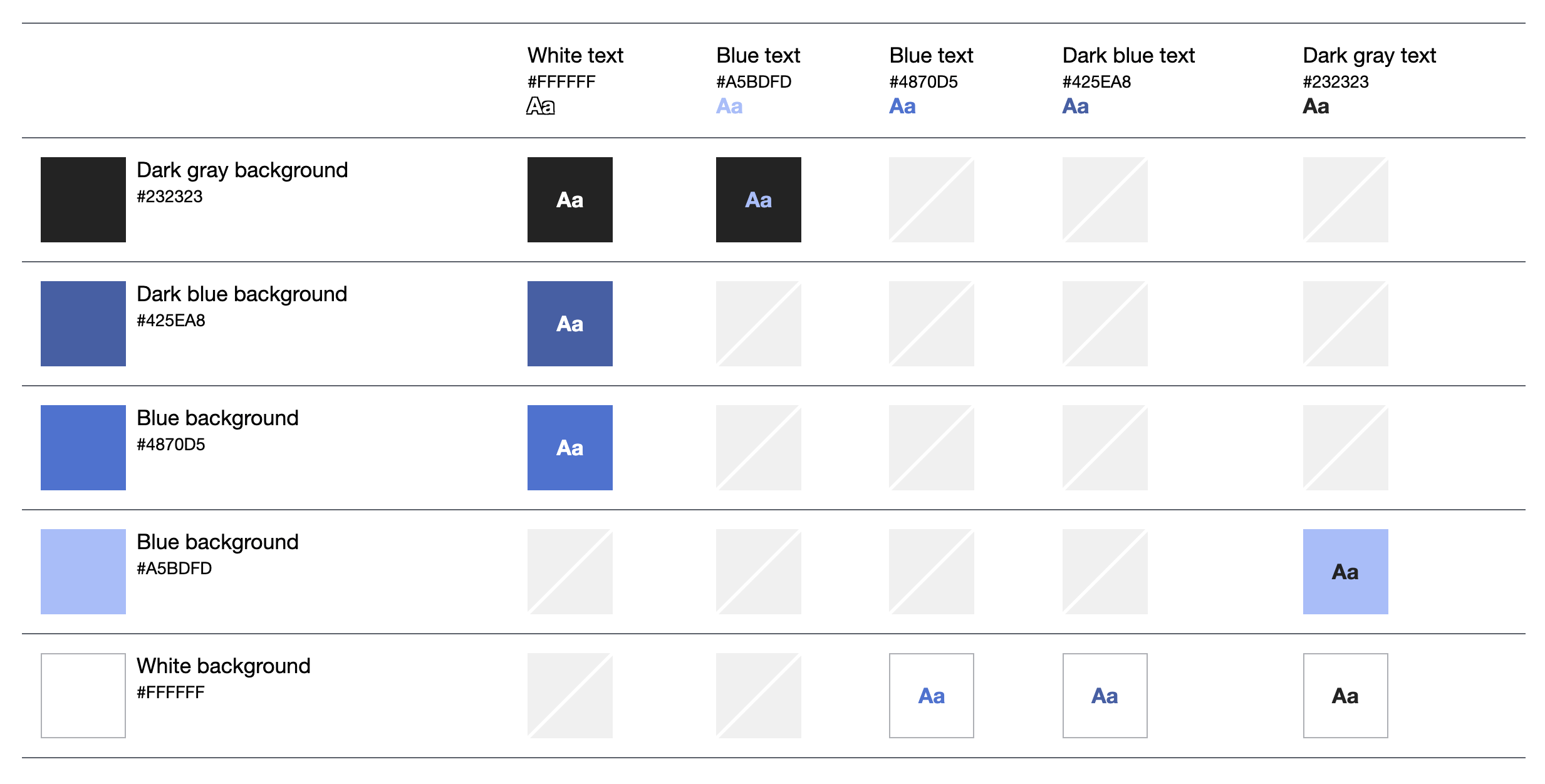
Light Blue
Hex #a5bdfd
Tertiary
Dark Teal
Hex #3d7f8d
Dark Green
Hex #3f897a
Yellow
Hex #e9ec5b
Dark Yellow
Hex #bac132
Blue
Hex #4870D5
Dark Blue
Hex #425ea8
Neutrals
White
Hex #ffffff
Cream
Hex #fcf9f2
Gray (Text)
Hex #4b4b4b
Dark Gray
Hex #232323
Black
Hex #000000
What the Ratings Mean:
AAA – This is enhanced contrast with a score of at least 7.0. Think longer form articles that will be read for a significant period of time.
AA – This is the sweet spot for text sizes below ~18pt. This is a score of at least 4.5.
AA Large – The smallest acceptable amount of contrast for type sizes of 18pt and larger. This is a score of at least 3.0.
Fail – Your text doesn’t have enough contrast with the background. You probably want to make it darker. This is a score of less than 3.0.
Read More: https://usecontrast.com/guide
Accessible Color Combinations for Text
Please don’t use these color combinations; they do not meet a color contrast ratio of 4.5:1, so they do not conform with the WCAG standards for body text. This means that some people would have difficulty reading the text. Employing accessibility best practices improves the user experience for all users. (GitHub Accessible Color Matrix)
Accessible Color Combinations for Color Blindness
Colors tested for conflicts using Adobe’s Color Blind Safe tool. No conflicts found. Swatches are color blind safe.
Accessible color themes won’t make a viewer with color blindness see the same colors as a normal viewer. Instead, think about it like this, if your original design requires every user to perceive five different colors then you need to make sure that all five colors are perceived differently. For people affected by color blindness, some specific combinations of hues and shades can lead to confusion, making such colors practically indistinguishable.
Deuteranopia and Protanopia are both types of the “red-green” color blindness, while Tritanopia is of the “blue-yellow” kind, with these color pairs referring to the potential conflicts for each kind of viewer.
Typography
H1 - Title Text
H2 - Title Text
H3 - Title Text
H4 - Title Text
H5 - Title Text
H6 - Title Text
Default Fonts
Headings - Poppins
A B C D E F G H I J K L M N O P Q R S T U V W X Y Z
a b c d e f g h i j k l m n o p q r s t u v w x y z
0 1 2 3 4 5 6 7 8 9
! @ # $ % ^ & * ( )
Body text – Nunito Sans 400 (Normal) – 20 px
A B C D E F G H I J K L M N O P Q R S T U V W X Y Z
a b c d e f g h i j k l m n o p q r s t u v w x y z
0 1 2 3 4 5 6 7 8 9
! @ # $ % ^ & * ( )
Lorem ipsum dolor sit amet, consectetur adipiscing elit. Ut elit tellus, luctus nec ullamcorper mattis, pulvinar dapibus leo.
Typescale
The typescale for headings uses Major Third intervals and a base size of 16px. All headers are set up in REMs that are multiples of the base font size (see below). This allows users to easily update the base font size in their browser to their preferred size for viewing. This type scale was generated using this tool. Read more about how REM are more accessible here.
Iconography
Site wide imagery is a mix of line drawings and photography from PB processes, trainings or other events.
PB Process Icons
These icons are used to illustrate the six phases of a PB process. They are also sometimes used as decorative visual elements to break up text. They can be static or animated to have motion. They are set up as an icon set, so you can easily recolor them to any of the brand colors.
Additional Design Elements
Tables
|
Header Col 1
|
Header Col 2
|
Header Col 3
|
|---|---|---|
|
Column 1
|
Column 2
|
Column 3
|
|
Column 1
|
Column 2
|
Column 3
|
|
Header Col 1
|
Header Col 2
|
Header Col 3
|
|---|---|---|
|
Column 1
|
Column 2
|
Column 3
|
|
Column 1
|
Column 2
|
Column 3
|